
字幕スタイル
AI クリッピング または モーメント検索 API で字幕を有効にした場合、cc_style_tpl パラメーターで字幕スタイルテンプレートを指定できます。smart-bg-focus、box-highlight、word-focus、underline-focus といった新しいフォーカス系スタイルも利用できます。
使い方
タスク送信時に cc_style_tpl の値としてスタイル ID を渡します:
curl -X POST https://wayinvideo-api.wayin.ai/api/v2/clips \
  -H "Content-Type: application/json" \
  -H "Authorization: Bearer YOUR_API_KEY" \
  -H "x-wayinvideo-api-version: v2" \
  -d '{"video_url": "https://www.youtube.com/watch?v=example", "enable_caption": true, "cc_style_tpl": "STYLE_ID"}'
利用可能なスタイル
| Style ID | Preview |
|---|---|
smart-bg-focus |  |
box-highlight |  |
word-focus |  |
underline-focus |  |
temp-0 |  |
temp-1 |  |
temp-2 |  |
temp-3 |  |
temp-4 |  |
temp-5 |  |
temp-6 |  |
temp-7 |  |
temp-8 |  |
temp-9 |  |
temp-10 |  |
temp-11 |  |
temp-12 |  |
temp-13 |  |
temp-14 |  |
temp-15 |  |
temp-16 |  |
temp-17 |  |
temp-static-1 |  |
temp-static-2 |  |
temp-static-3 |  |
temp-static-4 |  |
temp-static-5 |  |
temp-static-6 |  |
game-streamer-1 | 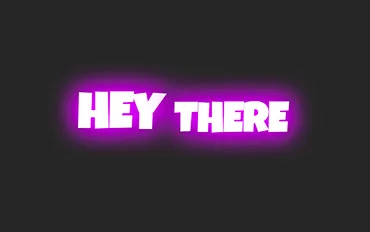 |
game-streamer-2 |  |
game-streamer-3 |  |
game-streamer-4 |  |
game-streamer-5 |  |
game-streamer-6 |  |
game-streamer-7 |  |
game-streamer-8 |  |
game-streamer-9 |  |
game-streamer-10 |  |
game-streamer-11 |  |
game-streamer-12 |  |
game-streamer-13 |  |
game-streamer-14 |  |
game-streamer-15 |  |
game-streamer-16 |  |
game-streamer-17 |  |
game-streamer-18 |  |
game-streamer-19 |  |
game-streamer-20 |  |
game-streamer-21 |  |
game-streamer-22 |  |
game-streamer-23 |  |
game-streamer-24 |  |
game-streamer-25 |  |
注意: プレビュー画像はおおよそのレンダリングイメージです。実際の結果は動画コンテンツや解像度によって若干異なる場合があります。
cc_style_tplを指定しない場合は、デフォルトの字幕スタイルが適用されます。